I work in fintech sales and business development. I use AI to think through an idea, make something I can test, and catch what I missed. Sometimes that becomes a payment diagram or this website.
I let it handle some of the mechanical work. I decide what holds up, what belongs in a buyer conversation, and what goes out under my name.
Sometimes that means research before a meeting. Sometimes it turns into a tool.
?
Before a first conversation.
I read an institution’s annual report and recent news before I reach out. AI can help me spot a change worth checking, but I go back to the source for the date and context. If the signal holds up, I use it to ask a better question. If it doesn’t, it stays out of the conversation.
A public filing can tell me what changed. It cannot tell me whether anyone is buying.
01 / A project I built
Flow of Funds
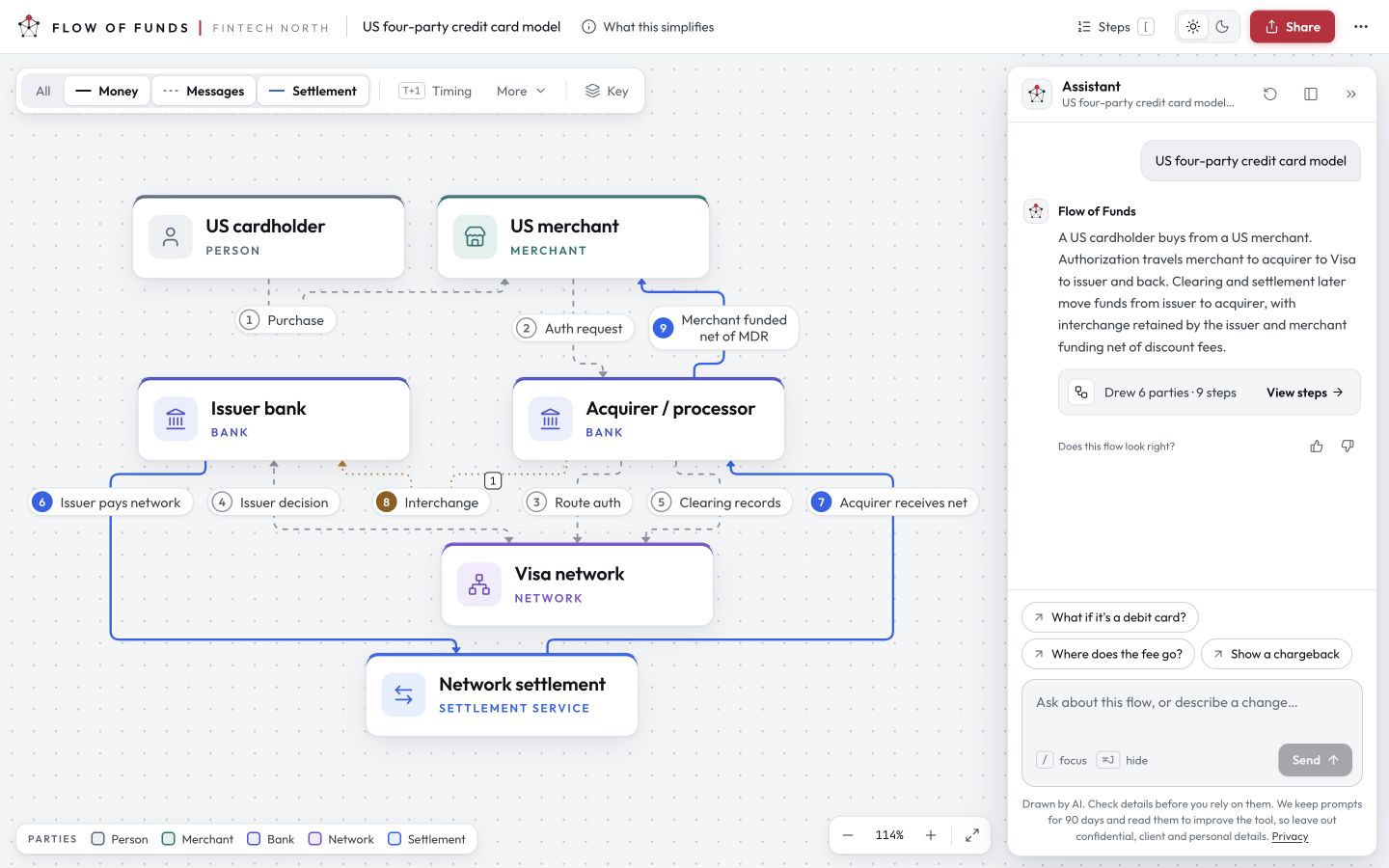
I built a way to describe a payment and explore the steps as a diagram. It gives me something concrete to work through: who is involved, what moves, and what the explanation leaves out.
What I check: a convincing diagram still needs to match the payment flow. Drawing a line between two boxes doesn’t establish that money moves that way.
A saved view of the tool. The diagram is a starting point for checking the explanation.
02 / Live, and still being edited
This website
AI helped with the code, image editing and reviews. I supplied the experience and kept correcting the story. The homepage portrait is AI-assisted, and its setting is composed.
A detail that matters
I was one of the first sales hires and grew the client base from one to twelve.
That context keeps my part in the result clear. The same review needs to catch a page that sounds impressive but no longer sounds like me.
The Toronto detail started with the time and directions. When I considered adding weather, I wanted it to do something more useful than display a temperature: help someone visiting decide what to bring.
That became “Come say hello,” with a little advice about layers, a weather-dependent joke and a way to arrange a conversation. The observation source and time are there if you want to check them. If the data is stale, the advice disappears.
It’s a small design decision. Whether visitors find it useful is something I’m still learning.
03 / A small public experiment
The Details
The watch, tee and shoes in the portrait, plus the bike farther down, are clickable. I wanted to see what happens between noticing a detail and finding the real thing.
What still matters: the right item, available option, current price and an honest handoff to the seller. A clickable marker is only the beginning.
For now, the links open retailers. Purchases happen there.
How I keep the context.
I use Basic Memory Cloud for selected background and working preferences. The aim is to keep the useful context current, with the actual work staying in its own files and tools.
01
Context worth keeping
How I write, the work I do, and the purpose of a project. A small set of maintained notes.
Basic Memory Cloud
02
Instructions to reuse
Find the point, keep my voice, challenge the claim. Skills give an assistant a specific job.
Written instructions
03
Where the work stands
The goal, what’s decided, what’s open and the next move. Enough to pick the work up again.
The current project
What that does, and doesn’t, mean
The intention is to reuse the relevant context across tools that can access it. Each connection needs checking. A shared note doesn’t make separate assistants share a conversation, and saved context can still be wrong or out of date.
This page shows the approach and public examples. Private notes, conversations and account configuration stay out of the public material.
What I reach for.
Thinking things through
GPT and Claude
My daily drivers, because I’m basic. Useful for another version, another angle, or a question I haven’t asked yet.
Turning an idea into something
Codex
I use it to make and test things. Flow of Funds is one example.
Getting the thought out
Wispr Flow and saved context
Dictation helps me start. The notes and instructions help an assistant work with the idea, including the corrections.
Other things I’ve tried
Midjourney for image experiments, and Jev, GLM and DeepSeek when I want to try another model. Hermes is in the wider setup. These are experiments, not a list of tools I use every day.
If you want to talk about the work, the experiments, or something you’re building: